Deploy from Git
Turn a GitHub, GitLab or Bitbucket repository into a live site on a server you already have.

xCloud for AI agents
AI agent hosting management means an AI agent such as Claude Code, Cursor, Codex or OpenClaw deploys, monitors and fixes your servers and sites for you. xCloud makes this work: it exposes an MCP server, an installable skills package and a Public API, so any agent can run your hosting while you approve the changes.
YouWhich of my sites have pending WordPress updates? Back each one up, then update, and tell me what changed.
sites_wordpress_updatesread-only
AgentThree sites have updates: shop (4 plugins), blog (2 plugins, 1 theme), docs (WordPress core). Back up all three and apply the updates?
YouYes.
sites_backup, sites_wordpress_updateneeds approval
AgentBackups finished. 7 updates applied, all three homepages answer 200. The docs site is on WordPress 7.0 now.
. Keep a human in the loop: xCloud stops and asks before anything that creates, deploys, updates, reboots, deletes or buys.
Agents
Eighteen agents have a dedicated xCloud guide. Each row shows how that agent connects and how it authenticates; open the guide for the exact commands, example prompts and a page per hosting job.
| Agent | Made by | How it connects to xCloud | Authentication | Guide |
|---|---|---|---|---|
| Claude Code | Anthropic | xCloud MCP server, plus the Agent Skills | OAuth sign-in, or an API key for headless use | Claude Code guide |
| Claude | Anthropic | xCloud MCP server | OAuth sign-in | Claude guide |
| Claude Cowork | Anthropic | xCloud MCP server | OAuth sign-in | Claude Cowork guide |
| Cursor | Cursor | xCloud MCP server, plus the Agent Skills | OAuth sign-in, or an API key header | Cursor guide |
| Codex | OpenAI | xCloud MCP server, plus the Agent Skills | OAuth sign-in, or an API key from the environment | Codex guide |
| OpenCode | Anomaly (open source) | xCloud MCP server | OAuth sign-in, or an API key for headless use | OpenCode guide |
| Hermes Agent | Nous Research | xCloud MCP server, plus the Agent Skills | OAuth sign-in, or an API key for headless use | Hermes Agent guide |
| OpenClaw | Open source | xCloud MCP server, plus the Agent Skills | OAuth sign-in with openclaw mcp login | OpenClaw guide |
| Windsurf | Cognition (formerly Codeium) | xCloud MCP server | OAuth sign-in, or an API key for headless use | Windsurf guide |
| GitHub Copilot | GitHub | xCloud MCP server, plus the Agent Skills | OAuth sign-in | GitHub Copilot guide |
| Gemini CLI | xCloud MCP server | OAuth sign-in, or an API key for headless use | Gemini CLI guide | |
| ChatGPT | OpenAI | xCloud MCP server | OAuth sign-in | ChatGPT guide |
| ChatGPT dots | OpenAI | xCloud MCP server | OAuth sign-in | ChatGPT dots guide |
| Grok | xAI | xCloud MCP server | OAuth sign-in, or an API key for headless use | Grok guide |
| Grok Bot | xAI | xCloud MCP server | OAuth sign-in, or an API key on a Team Bot | Grok Bot guide |
| Kiro | Amazon Web Services | xCloud MCP server, plus the Agent Skills | OAuth sign-in, or an API key for headless use | Kiro guide |
| Antigravity | xCloud MCP server | OAuth sign-in, or an API key for headless use | Antigravity guide | |
| Zed | Zed Industries | xCloud MCP server | OAuth sign-in, or an API key for headless use | Zed guide |
Using an agent that is not listed? Any MCP-compatible client can use the xCloud MCP server, and any agent with a skills directory can load the xCloud Agent Skills. xCloud MCP · AI Agent Skills
Three ways in
An agent reaches xCloud through the hosted MCP server, the Public API, or the xCloud Agent Skills package layered on top of either. All three are free with every account. The MCP server exposes one tool per customer-facing Public API operation and leaves out eleven internal ones (the health check, API token management and the native apps' sign-in and push plumbing); the skills add workflow know-how and, on their own, only a read-only REST fallback.
| Surface | Used by | Authentication | What you get | Learn more |
|---|---|---|---|---|
| xCloud MCP server | Claude Code, Claude, Cursor, Codex, OpenCode, Hermes Agent, OpenClaw, Windsurf, GitHub Copilot, Gemini CLI, ChatGPT, ChatGPT dots, Grok, Grok Bot, Kiro, Antigravity, Zed and any client that speaks MCP Streamable HTTP | OAuth sign-in in the browser; an API key with the mcp:invoke scope and the abilities it needs for clients without a browser | One tool per customer-facing Public API operation (188 today; eleven internal ones are left out) plus two search tools; a compact five-tool profile for clients that cap tools | xCloud MCP |
| xCloud Agent Skills | Claude Code (plugin), OpenClaw (ClawHub), and any agent with a skills directory through the portable Agent Plugins package | Uses the MCP connection when one exists; otherwise a read-scoped API token for the GET-only REST wrapper | Nine Markdown skills that teach the agent xCloud's workflows: routing, dry run, confirmation, polling, diagnosis and retry | AI Agent Skills |
| xCloud Public API | Your own code: scripts, CI jobs, dashboards and long-running agent loops | Personal access token with scoped abilities, sent as a Bearer header | The same operations as REST, with an OpenAPI 3.0 spec to generate a typed client from | API reference |
Two minutes
Three steps: give the agent the MCP server URL, approve access in your browser, then ask. Agents with a skills directory can add the xCloud skills on top of that connection. Every agent guide repeats these steps with the exact command for that tool.
Every MCP client takes the server URL, and that connection is what reads, deploys and updates. Agents with a skills directory can then add the xCloud skills from ClawHub, the Claude Code marketplace or the portable package; the skills teach the workflows and do not replace the connection.
# The MCP server URL, pasted into any MCP client
https://app.xcloud.host/mcp

# Optional, on top of that connection: the xCloud skills
# Claude Code plugin
/plugin marketplace add xCloudDev/xcloud-agent-skills
/plugin install xcloud@xcloud-agent-skills
# OpenClaw, from ClawHub
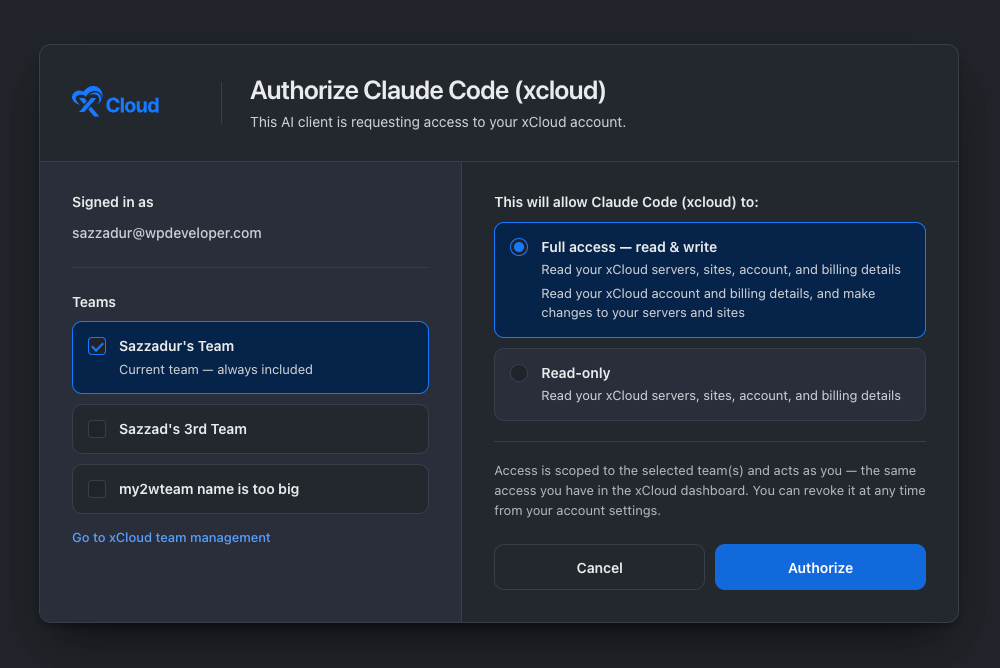
openclaw skills install @asif2bd/xcloudxCloud opens a sign-in page. Tick the teams the connection may act on and choose Read-only or Full access. Clients without a browser use an API key that carries the mcp:invoke scope and the read or write abilities it needs.
# Headless clients: an API key instead of OAuth
claude mcp add xcloud --transport http https://app.xcloud.host/mcp \
--header 'Authorization: Bearer YOUR_TOKEN'Describe the outcome in plain words. The agent finds the right xCloud tool, runs reads and routine actions such as backups and scans straight away, and stops to ask before anything that creates, deploys, updates, reboots, deletes or buys.
You: Deploy github.com/acme/shop to my Frankfurt server
     on a staging hostname, and back up the shop site first.

Agent: Detected a Node.js app on the main branch. Dry run passed.
  - Backup of shop.example.com: done
  - New site shop-staging.acme.xcloud.site: ready to create
Approve the deployment?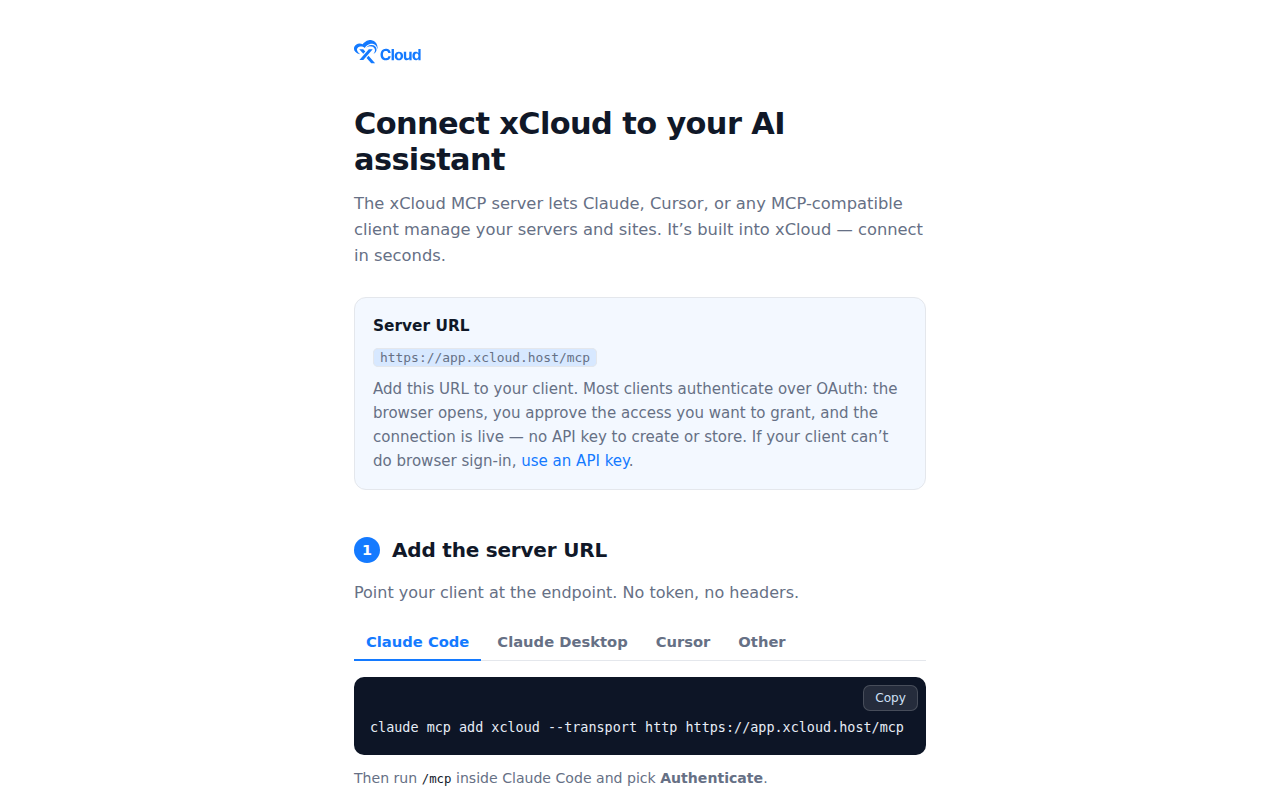
Verify in one line: ask your agent "Who am I on xCloud?". It should answer with your real account, not a guess. Full walkthrough: How to connect xCloud MCP to your AI agent.
What it can do
A connected agent reaches the operations the xCloud Public API exposes, grouped into nine areas. Reads and routine actions such as backups, cache purges, PageSpeed scans and vulnerability scans run straight away; creating, deploying, updating, rebooting, deleting, buying or starting a broken-link scan stops for your approval. A few steps, such as restoring a backup or editing a backup schedule, stay in the dashboard, and each job guide says which.
Git repositories, Docker Compose and Dockerfile apps, one-click apps, branch staging and new WordPress sites, with a dry run before anything is created.
Find the cause of a 500, 502 or 503 from status, recent events, bounded web-server logs, WordPress health and services, instead of guessing.
Diagnose a slow site from monitoring history, cache state, existing PageSpeed results, traffic and the PHP version.
Inventory and monitoring, services, Node.js and PHP versions, firewall and Fail2Ban, cron jobs, verified reboots and approved server purchases.
Domains, cache, backups including Docker apps, staging environments, deployment events, SSH and SFTP, access logs and site cron.
Site health, plugin and theme updates, vulnerability checks and fleet summaries, broken-link scans, PageSpeed, WP_DEBUG and magic login links.
Certificate status and HTTPS checks, Let's Encrypt and xCloud certificates, custom and Cloudflare certificates, installation and renewal.
Plans, prices, invoices, bills, subscriptions, masked payment methods, approved invoice payments and mailbox or mail-delivery add-ons.
Who you are, which teams the connection may act on, incident alerts, Git and Cloudflare integrations, API tokens and WordPress blueprints.
Jobs
Every agent guide has a page for each of the ten jobs below, with the exact setup, the tools involved, a settings reference, example prompts and the limits that apply.
Turn a GitHub, GitLab or Bitbucket repository into a live site on a server you already have.
Run a Dockerfile or Docker Compose app on a Docker server, keep it backed up and recover it when a deploy fails.
Pick an app from the xCloud catalogue, check it fits your server, install it and get the login details.
Keep WordPress sites updated, scanned and healthy, and create new ones, by asking in plain words.
Check that your sites are backed up, take a backup before a risky change, and open a staging copy to test it on.
Check a site's certificate and DNS, install or renew HTTPS, and see which domains point at it.
See how your servers are doing, change services and runtimes, tighten security and reboot with proof it worked.
Find out why a site returns a 500, 502 or 503, shows a critical error or has stopped answering.
Find out why a site is slow, from real numbers, and learn which fix is a dashboard switch.
Find vulnerable sites, manage server firewall rules and banned IPs, and see which protections are on.
Reference
One tool per customer-facing Public API operation, grouped into toolsets, plus two search tools that help the agent find the right operation and answer questions from the documentation. Narrow a connection to the areas you need, or use the compact profile for clients that cap tools.
| Toolset | Tools | What it covers |
|---|---|---|
| servers | 61 | Create and list servers, monitoring stats, PHP and Node.js versions, services such as Redis and Docker, cron jobs, firewall rules, Fail2Ban, sudo users, reboots, staging hostname suggestions. |
| sites | 60 | Create, list and inspect sites, deploy from Git (native or Docker Compose), staging environments for Git sites, deploy diagnosis and correction, domains, DNS checks, SSL, cache purges, backups, cron jobs, events and logs. |
| billing | 10 | Current plan, billing overview, bills and invoices. |
| addons-mailbox | 9 | Mailbox plans, purchase, list, inspect, delete, verify DNS. |
| oneclick-apps | 7 | Browse the one-click catalogue, check server compatibility, install, poll status, fetch credentials, stop or redeploy. |
| vulnerabilities | 6 | Per-site findings and counts, the team-wide rollup, rescans, ignore and unignore a finding. |
| wordpress-actions | 5 | Update or activate plugins and themes, refresh the inventory, toggle WP_DEBUG, generate a magic login link. |
| sites-wordpress | 4 | List plugins and themes, the updates summary and the site health status. |
| broken-links | 4 | Trigger a broken-link scan and read its findings. |
| addons-mail-delivery | 4 | Mail Delivery plans, purchase and subscriptions. |
| alerts | 3 | List incident alerts, read one, mark it read. |
| pagespeed | 3 | Trigger a PageSpeed scan, latest snapshot, history. |
| ssl-certificates | 3 | Inspect, check and delete a certificate. |
| integrations | 3 | Connected Cloudflare and Git providers and their repositories. |
| catalog | 2 | The app catalogue and hosting pricing. |
| user | 2 | The current user and the teams the connection may act on. |
| blueprints | 1 | List blueprints. |
| payments | 1 | Pay an invoice. |
| xcloud_agent_search | 1 | Finds the right operation and the order to call things in. The assistant uses it when it is not sure which tool fits. |
| xcloud_docs_search | 1 | Answers a question from the xCloud documentation, so "how does the edge cache work?" is answered without a tool call against your account. |
Server URL https://app.xcloud.host/mcp · compact profile https://app.xcloud.host/mcp?profile=compact · live toolset list · Public API reference
Unattended
Yes, where the agent runtime has its own scheduler. OpenClaw automations run a prompt on a cron expression, and Hermes Agent runs scheduled tasks; both call xCloud through the MCP connection, with the xCloud skills as an optional layer on top. The confirmation step still applies: a scheduled job can read, run PageSpeed and vulnerability scans and report on its own; a backup belongs in a request you are watching, because a Docker backup stops the app while it captures; and a broken-link scan and anything that creates, deploys, updates, reboots, deletes or buys waits for a person.
A weekday job can check every site for pending WordPress updates and open vulnerabilities, read the latest PageSpeed results and post the summary to Telegram, leaving the updates and any backup for a message you can approve. Connect the MCP server first (openclaw mcp add with --auth oauth, then openclaw mcp login), add the xCloud skill from ClawHub on top if you want the workflow know-how, then create the automation.
openclaw automations create "0 9 * * 1-5" \
  "Use xCloud to list sites with pending WordPress updates and open vulnerabilities, read the latest PageSpeed result for each, and summarise what needs approval. Change nothing and start no backup." \
  --name "Morning hosting check" --session isolated
Hermes keeps memory across sessions and runs scheduled tasks, so a daily health report over the xCloud MCP connection needs no new prompt from you.
mcp_servers:
  xcloud:
    url: "https://app.xcloud.host/mcp"
    auth: oauth
Keep a human approving the queue. xCloud refuses the operations that cost money or break something unless the call carries an explicit confirmation. See the OpenClaw guide and the Hermes Agent guide.
Short answers to what people ask before they connect an agent. Every answer is also on the agent guides.
It is when an AI agent, rather than a person clicking through a dashboard, deploys, monitors and repairs your servers and sites. With xCloud the agent calls the MCP server or the Public API, guided by the Agent Skills where they are installed, picks the right operation and runs it under the access you granted. Reads and routine actions such as backups, cache purges and scans run straight away; creating, deploying, updating, rebooting, deleting or buying is previewed first and waits for your approval. Changes need one of those two connections; the skills on their own only read.
xCloud has guides for 18 agents: Claude Code, Claude, Claude Cowork, Cursor, Codex, OpenCode, Hermes Agent, OpenClaw, Windsurf, GitHub Copilot in VS Code, Gemini CLI, ChatGPT, ChatGPT dots, Grok, Grok Bot, Kiro, Antigravity and Zed. Any other client that speaks MCP Streamable HTTP works the same way, and an agent with a skills directory can load the Agent Skills on top of that connection.
Usually not. Most clients sign in with OAuth: the browser opens, you choose the teams and the access level, and the connection is live. An API key is only needed for clients that cannot open a browser, and it must carry the explicit mcp:invoke scope plus the read or write abilities for the operations it will use; full access alone does not enable MCP.
The MCP server is a hosted endpoint at app.xcloud.host/mcp that exposes xCloud as tools for MCP clients. The Agent Skills are Markdown files, installed as a Claude Code plugin, from ClawHub or as a portable package, that teach an agent xCloud's workflows on top of those tools. The Public API is the REST layer underneath both, for code you write yourself.
No. OpenClaw is an open-source personal agent that extends itself with skills, so the usual path is the xCloud skill from ClawHub. OpenClaw can also act as an MCP client and connect to the xCloud MCP server directly. MCP, the Model Context Protocol, is the open standard Claude, Cursor, Codex and the other clients use to call the hosted server.
Use Claude on the web or desktop if you chat with Claude and want to add xCloud as a custom connector. Use Claude Code if you work in the terminal and want the claude mcp add command and the skills plugin. Use Claude Cowork if you delegate desktop tasks; it shares the connectors you set up in your Claude account.
Not for the operations xCloud gates. Reads run straight away, and routine actions such as cache purges, backups, service restarts, PageSpeed and vulnerability scans run without a prompt. Anything that creates, deploys, updates, reboots, deletes or buys is refused by xCloud unless the call carries an explicit confirmation, and the tool tells the agent to get your approval first. You can also start Read-only and widen access later.
Yes, if the agent runtime has a scheduler. OpenClaw automations and Hermes Agent scheduled tasks can check sites, run PageSpeed and vulnerability scans and report on their own through the xCloud connection. A backup belongs in a request you are watching, because a Docker backup stops the app while it captures, and changes that need confirmation wait for a person, which is how it should stay.
Yes. The MCP server, the Agent Skills and the Public API are included with every xCloud account, including the free plan, on managed and self-managed servers. There is no separate plan, no add-on and nothing to upgrade. Your AI assistant may have its own usage cost from its provider.
Deploy from Git, run Docker apps, install one-click apps, manage WordPress, back up and stage sites, manage SSL and domains, manage servers, troubleshoot a broken site, speed up a slow site and secure sites and servers. Each agent guide has a page for every one of these ten jobs.
Pick the agent you already use, paste one URL or one install command, and run your hosting by asking.